


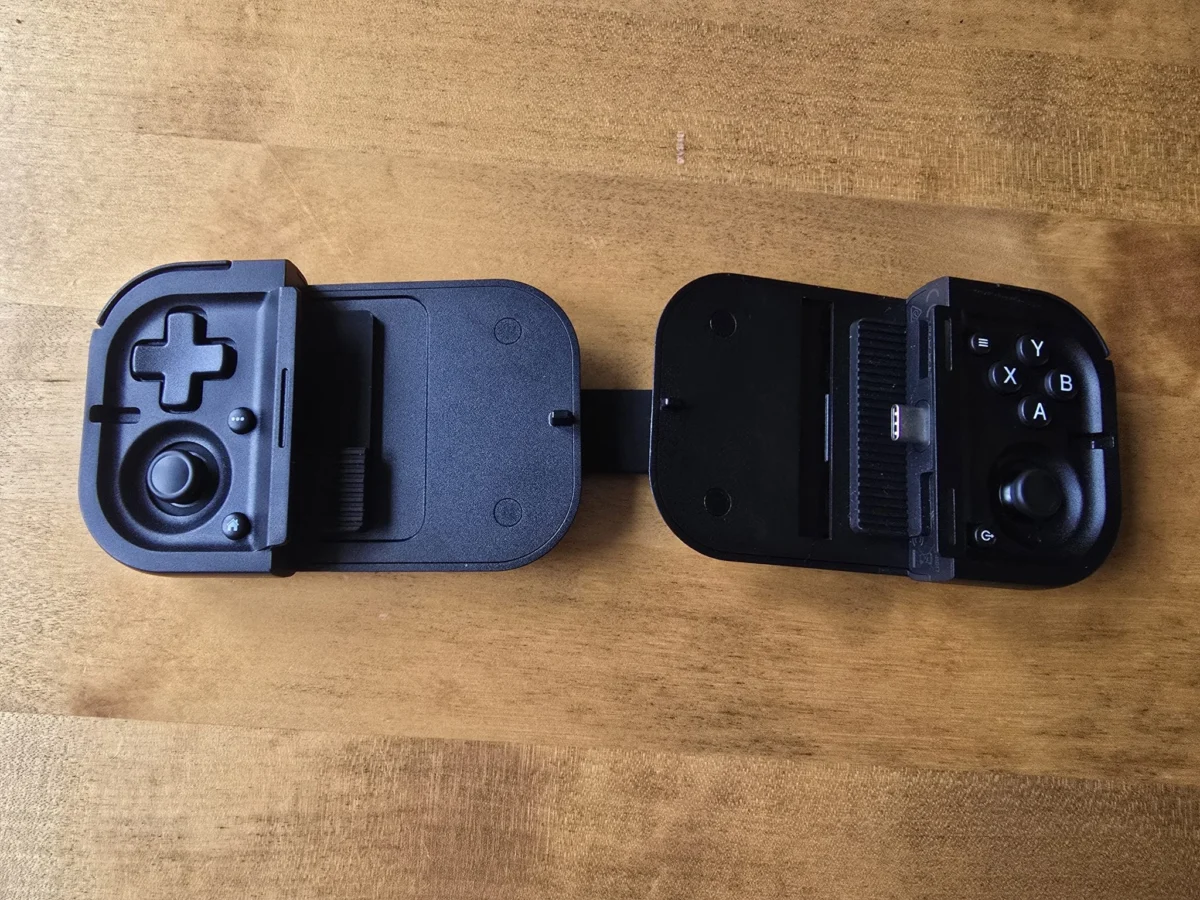
The mobile gaming hardware sector has witnessed a significant pivot with the release of the Razer Prio, a device that prioritizes extreme portability over the traditional ergonomic bulk of contemporary mobile grips. While Razer has established a dominant market presence with its Kishi series—specifically the Kishi V3 and Kishi Ultra—the Prio represents a strategic departure toward a "lifestyle-first" design philosophy. This foldable controller aims to bridge the gap between casual "on-the-go" gaming and the high-performance requirements of cloud-based and native mobile AAA titles. By adopting a form factor reminiscent of early 2000s technology, specifically the clamshell design of the Game Boy Advance SP, Razer is targeting a demographic that demands hardware capable of fitting into a standard pocket alongside a wallet and smartphone.

Engineering and Physical Design Specifications
The Razer Prio distinguishes itself through its minimalist footprint and lightweight construction. Tipping the scales at a mere 101 grams, the device is lighter than most modern smartphones. When folded, its dimensions are roughly equivalent to a stack of credit cards, making it the most compact controller in Razer’s current lineup. The aesthetic is defined by a matte black finish, a staple of the Razer ecosystem, though it lacks the aggressive RGB lighting or textured grips found on the more expensive Kishi models. This design choice appears intentional, emphasizing durability and "throw-and-go" utility for users who carry their devices in pockets or cluttered bags.
The structural integrity of the Prio relies on a thick, elastic rubber strap that connects the two primary controller modules. This strap provides the tension necessary to secure a smartphone in a landscape orientation. The deployment mechanism involves a side-mounted latch that releases the modules, which then swivel 180 degrees to expose the USB-C connector. This mechanical simplicity allows for a setup time of under 30 seconds, a critical metric for mobile users engaging in short gaming sessions during commutes or breaks.

Connectivity and Hardware Compatibility
In a move to minimize input lag, Razer has opted for a direct USB-C connection rather than Bluetooth. This decision aligns the Prio with high-end mobile peripherals, as physical connections bypass the latency issues often associated with wireless protocols. The controller is powered directly by the smartphone’s battery via the USB-C port. Data suggests that the power draw of the controller itself is negligible—estimated at less than 50mA—compared to the significant battery drain caused by high-refresh-rate displays and GPU-intensive gaming.
The Prio supports devices with screens up to 7 inches, accommodating the vast majority of flagship Android devices and the iPhone 15 and 16 series. However, hardware testing reveals limitations regarding protective cases. While Razer markets the device as "case compatible" through the use of swappable rubber inserts, the recessed nature of the USB-C plug may prevent a secure connection with ruggedized or high-clearance cases, such as those with integrated port covers. For users of larger devices like the Samsung Galaxy S24 Ultra, a "naked" phone or a ultra-slim case is often required for the connector to seat properly.

Ergonomic Analysis and Control Interface
The primary trade-off for the Prio’s portability is found in its ergonomics. The controller utilizes a symmetrical stick layout, which may feel alien to users accustomed to the offset (asymmetric) sticks of Xbox or Nintendo Switch controllers. The face buttons and analog sticks are diminutive, drawing comparisons to the PlayStation Vita. While the face buttons offer a tactile, quiet click and the d-pad provides a soft but distinct directional response, the lack of substantial palm grips necessitates a "claw-style" hold for users with larger hands.
The analog triggers are a notable inclusion, though their travel distance is shorter than those found on full-sized controllers. They function on a straight-down vertical axis rather than a curved pull, which is sufficient for casual racing titles like Asphalt Legends but may lack the precision required for competitive simulation racers. Furthermore, the capacitive thumbsticks, though small, feature a high-friction surface to compensate for their limited diameter. For sessions exceeding 60 minutes, the flat profile of the device may lead to hand fatigue, positioning the Prio as a tool for short-burst gaming rather than marathon sessions.

Software Integration and the Razer Cortex Ecosystem
The Prio is designed to work in tandem with the Razer Cortex Mobile app. Upon connection, the app can be configured to launch automatically, serving as a unified dashboard for installed games and streaming services. The software provides a central hub for titles from the Google Play Store, App Store, Xbox Cloud Gaming, and Steam Remote Play.
A dedicated hardware button on the Prio allows users to toggle back to the Cortex interface instantly. Within the app, users can customize controller mapping and sensitivity profiles on a per-game basis. However, the software experience is not without its hurdles. Technical analysis indicates that the "per-game" settings interface can be unintuitive for new users, and the app occasionally struggles with background task management on certain Android skins, requiring manual intervention to ensure the controller is recognized by the active game.

Performance Testing: Native Gaming and Compatibility
Testing the Razer Prio across a variety of mobile titles reveals a fragmented landscape of controller support within the mobile industry.
- Seamless Integration: High-profile titles such as Diablo Immortal and Fortnite demonstrated native, "plug-and-play" compatibility. In these environments, the Prio’s low latency via USB-C provided a clear advantage over touch controls, particularly in fast-paced combat scenarios.
- Partial Support: Titles like Honkai: Star Rail required specific launch sequences through the Cortex app to recognize the input. Destiny Rising performed adequately, though the small stick size made precision sniping more difficult than on larger peripherals.
- Compatibility Failures: Despite the Prio’s hardware quality, several major titles failed to recognize the input. Call of Duty: Mobile—which historically prioritizes Bluetooth controllers (specifically Xbox and PlayStation controllers)—often fails to detect USB-C peripherals like the Prio without third-party mapping software. Similarly, certain retro ports, such as Konami’s Castlevania mobile releases, exhibited button-mapping errors that could not be resolved within the game’s native menus.
These issues highlight a broader industry challenge: while the hardware is capable, the lack of standardized controller APIs across the Android and iOS ecosystems remains a significant barrier for end-users.

Cloud Gaming and Emulation: The Prio’s Strongest Use Case
The Razer Prio excels in the realm of cloud streaming and emulation. Testing via Xbox Cloud Gaming (Project xCloud) showed near-perfect performance in titles like Forza Horizon 6 and Minecraft Dungeons. The USB-C connection is particularly beneficial here, as it removes one layer of latency from the streaming pipeline, which is already burdened by network-based lag.
For the emulation community, the Prio offers a compelling solution for playing classic titles on platforms like RetroArch or Dolphin. The tactile d-pad and symmetrical layout are well-suited for 8-bit and 16-bit era games. The ability to fold the controller and store it in a pocket makes the smartphone-plus-Prio combination a formidable rival to dedicated retro handheld devices.

Market Positioning and Financial Context
At a retail price point of $99.99 (£99.99 / €109.99), the Razer Prio enters a highly competitive market. It is priced identically to many full-sized mobile controllers, including Razer’s own Kishi V3. This creates a value proposition paradox:
- Kishi V3 / Backbone One: These devices offer superior ergonomics, haptic feedback, passthrough charging, and 3.5mm headphone jacks for the same price.
- Razer Prio: This device offers extreme portability and a unique folding mechanism but strips away haptics, back buttons, and ergonomic depth.
Razer is clearly positioning the Prio as a niche "specialist" tool for the ultra-mobile professional or student rather than a primary controller for the home-based mobile gamer. The cost reflects the engineering required to miniaturize the components and the durable swiveling hinge mechanism rather than a feature-rich internal specification.

Industry Implications and Future Outlook
The launch of the Razer Prio suggests a maturing mobile gaming market that is beginning to segment into specialized categories. We are seeing a move away from "one-size-fits-all" grips toward a bifurcated market: one side focusing on "console-quality" experiences (like the Razer Kishi Ultra) and the other focusing on "ubiquitous access" (like the Prio).
As cloud gaming services continue to expand and 5G infrastructure becomes more robust, the demand for "always-on-you" hardware is expected to grow. However, the Prio’s success will likely depend on whether mobile game developers adopt more universal controller standards. Until native support becomes as seamless as it is on consoles, hardware like the Prio will remain a high-quality solution to a software-hampered problem.

In summary, the Razer Prio is a well-engineered piece of hardware that successfully achieves its goal of extreme portability. While it suffers from the ergonomic limitations inherent in its size and faces an uphill battle with inconsistent mobile game support, it provides a best-in-class experience for cloud streaming and retro emulation. For the specific user who prioritizes pocket space above all else, the Prio represents the current pinnacle of mobile controller miniaturization.