


The EPOMAKER RT98 Modular Mechanical Keyboard represents a significant shift in the design philosophy of enthusiast-grade peripherals, moving toward a highly customizable, modular architecture that challenges the traditional fixed-layout keyboard market. As the latest entry in the manufacturer’s "RT" series, the RT98 is currently undergoing a high-profile crowdfunding campaign on Kickstarter, where it has already surpassed its initial funding goals ahead of its late-April conclusion. This device is characterized by two primary innovations: a modular internal structure that allows for the relocation of the numeric keypad and an integrated digital display that is currently among the largest available in the mechanical keyboard sector.

Architectural Design and the 98 Percent Layout
The RT98 utilizes a 98% layout, a form factor often referred to in the industry as the 1800 compact layout. This design choice is intended to provide the full functionality of a 104-key standard keyboard while significantly reducing the horizontal footprint by compressing the navigation cluster and moving the numeric keypad closer to the main typing area. For professional users and gamers, this layout offers a compromise between space efficiency and the necessity of a dedicated numpad for data entry or macro execution.
The aesthetic of the RT98 leans toward a "retro-modern" hybrid, utilizing a creamy, vanilla-toned chassis that evokes the classic computing era of the 1980s and 90s, while incorporating modern RGB lighting and high-resolution digital components. The build quality adheres to the standards established by previous EPOMAKER models, such as the RT100 and TH108 Pro, utilizing a gasket-mount internal structure. This mounting style, which suspends the keyboard plate between silicone or foam gaskets, is designed to dampen acoustic vibrations and provide a more cushioned, consistent typing experience.

The Mechanics of Modularity: The Swappable Numpad
The defining feature of the RT98 is its modularity. Unlike standard keyboards where the numeric keypad is permanently fixed to the right side, the RT98 allows users to disassemble the unit and move the numpad to the left side of the main typing cluster. This "southpaw" configuration is highly sought after by specific segments of the market, particularly Excel power users and gamers. By placing the numpad on the left, right-handed users can maintain their mouse in a more ergonomic position closer to the center of their body, while still having access to numeric inputs with their non-dominant hand.
However, the modularity of the RT98 is an involved hardware process rather than a "hot-swap" software adjustment. To facilitate the transition, the user must employ a hexagonal wrench to remove the external screws and a prying tool, such as a plastic spudger, to separate the shell from the internal assembly. The numeric keypad is connected to the primary PCB via a delicate ribbon cable. During the reconfiguration, this cable must be carefully detached and re-routed to the opposite side of the chassis.

Technical analysis of this modular system suggests a commitment to enthusiast-level customization, though it presents a barrier to entry for casual users. The reliance on ribbon cables and physical screws emphasizes that this is a semi-permanent hardware modification rather than a feature designed for frequent daily changes. Industry reactions to this design have highlighted the rarity of such features in mass-produced keyboards, noting that "southpaw" layouts are typically reserved for expensive, limited-run custom kits.
Integrated Visual Interface and Display Customization
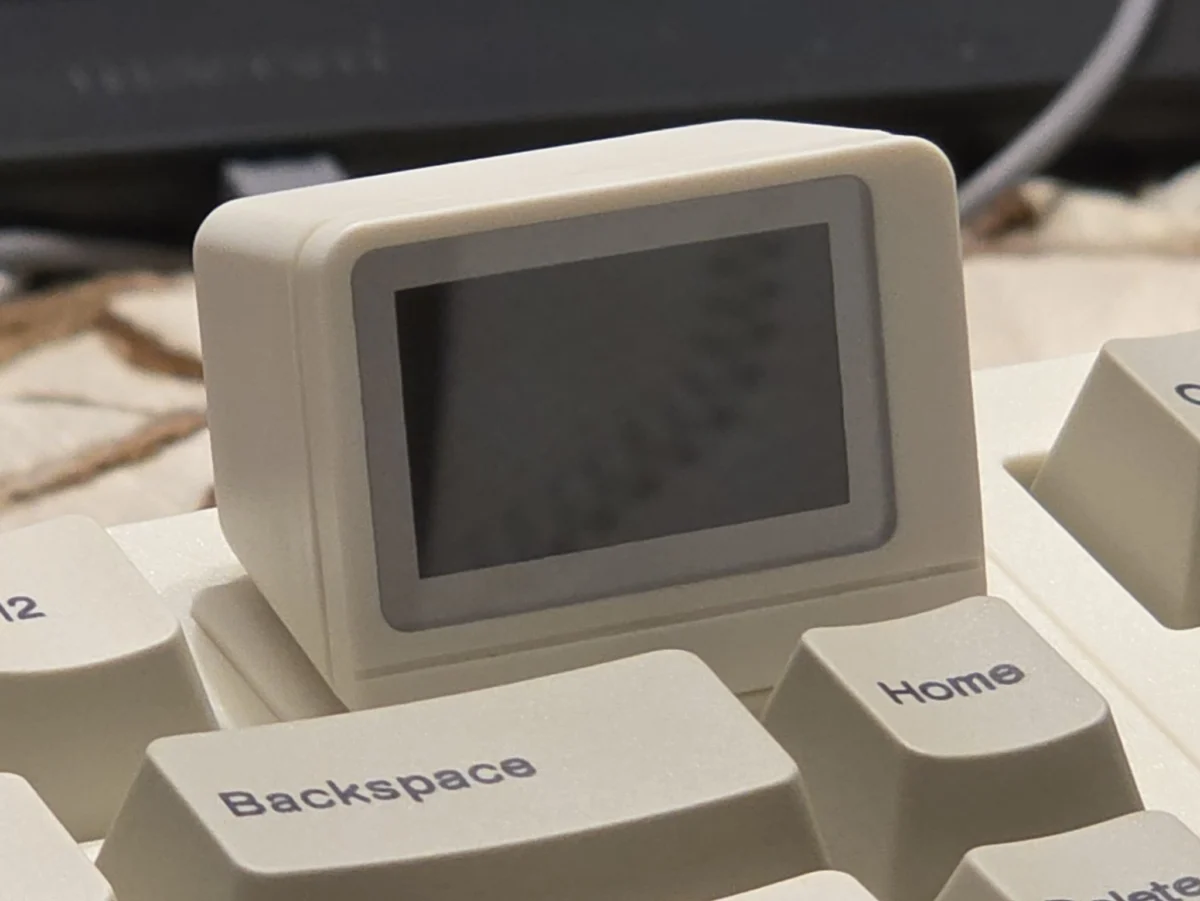
A standout component of the RT98 is its integrated mini-screen, situated at the top of the main keyboard interface. While screens have become a popular trend in mechanical keyboards, the RT98’s display is notably larger than its predecessors. This screen serves multiple functions, including displaying the current time, battery percentage, connection mode (Bluetooth, 2.4GHz, or Wired), and system OS status (Windows or macOS).

Beyond utility, the display offers deep personalization options through web-based software. Users can upload up to three animated GIFs to the device, which play at a consistent frame rate—approximately 30 frames per second—providing a high degree of visual flair. The software handles the necessary compression and contrast adjustments before flashing the data to the keyboard’s internal memory. This feature targets the "desk-setup" subculture, where visual aesthetics and individual expression are as prioritized as hardware performance.
Technical Specifications and Connectivity
Under the keycaps, the RT98 features EPOMAKER’s proprietary linear switches. These switches are characterized by a smooth travel distance without a tactile "bump" or audible click, making them suitable for both high-speed typing and responsive gaming. The unit is fully hot-swappable, meaning users can remove the stock switches and replace them with any standard 3-pin or 5-pin mechanical switches without the need for soldering. This ensures the keyboard’s longevity, as individual switches can be replaced if they fail or if the user’s tactile preferences change.

Connectivity is handled through a tri-mode system:
- Wired Mode: Utilizes a centered USB-C port for zero-latency performance and simultaneous charging.
- 2.4GHz Wireless: Provides a high-speed wireless connection via a dedicated USB dongle, suitable for gaming environments where latency is a concern.
- Bluetooth: Allows for pairing with up to three devices, including tablets and smartphones, facilitating a multi-device workflow.
The device also includes a physical toggle switch to alternate between macOS and Windows input modes, ensuring that key modifiers like "Command" and "Option" are correctly mapped across different operating systems.

Software Ecosystem and Accessibility Challenges
EPOMAKER has transitioned toward web-based customization tools for the RT98, utilizing the VIA open-source firmware standard. This approach allows users to remap keys and program macros through a Chromium-based browser (such as Chrome, Edge, or Vivaldi) without the need to install intrusive, permanent drivers on their operating system. This is a significant advantage for users concerned with system bloat or security.
However, the initial setup process involves some friction. Accessing the specific web applications for screen modification and macro programming currently requires scanning QR codes provided on a physical insert within the packaging. This necessitates the use of a secondary device (a smartphone) to bridge the gap between the hardware and the desktop browser. While the VIA software itself is highly praised for its robustness, the multi-step authentication and navigation required to customize the screen have been noted as areas for potential refinement in future software iterations.

Power Consumption and Battery Performance
One of the primary trade-offs for the RT98’s extensive feature set is its power consumption. The combination of a large, active digital display and per-key RGB backlighting places a significant strain on the internal battery. In active testing environments, the keyboard has demonstrated a battery life of approximately eight to ten hours when the screen is fully operational and the backlight is active.
For users who prefer a wireless setup, this necessitates frequent charging cycles. Consequently, many users may find themselves utilizing the RT98 in a permanently wired configuration to avoid the interruption of a depleted battery. While the screen can be removed or deactivated to extend battery life, doing so negates one of the primary selling points of the device. This power profile suggests that the RT98 is best suited as a centerpiece for a stationary desktop setup rather than a portable peripheral for travel.

Market Context and Broader Implications
The release of the RT98 comes at a time when the mechanical keyboard market is moving away from generic office peripherals and toward "modular" and "enthusiast" experiences. Companies like EPOMAKER are increasingly competing with boutique brands by offering features—such as gasket mounts, hot-swappable PCBs, and modular layouts—at a significantly lower price point through platforms like Kickstarter.
The success of the RT98’s crowdfunding campaign indicates a strong consumer appetite for "Southpaw" layouts and integrated displays. By providing the tools for users to 3D-print their own shells or replace every internal component, EPOMAKER is leaning into the "right to repair" and "right to customize" movements.

Conclusion and Future Outlook
The EPOMAKER RT98 Modular Mechanical Keyboard is a complex, feature-rich peripheral that successfully bridges the gap between mass-market accessibility and enthusiast-level customization. While the modularity requires physical tools and a degree of technical patience, the resulting versatility is nearly unmatched in its price bracket. The large-scale display and premium linear switches provide a high-quality tactile and visual experience, though the battery life remains a bottleneck for true wireless enthusiasts.
As the Kickstarter campaign concludes in late April, the RT98 is positioned to become a flagship model for EPOMAKER, signaling a future where the physical layout of a keyboard is no longer a static choice made at the point of purchase, but a dynamic feature that can evolve with the user’s needs. For the mechanical keyboard community, the RT98 represents a bold experiment in modularity that, despite minor software and power hurdles, sets a new benchmark for what consumers can expect from a mid-sized mechanical keyboard.