


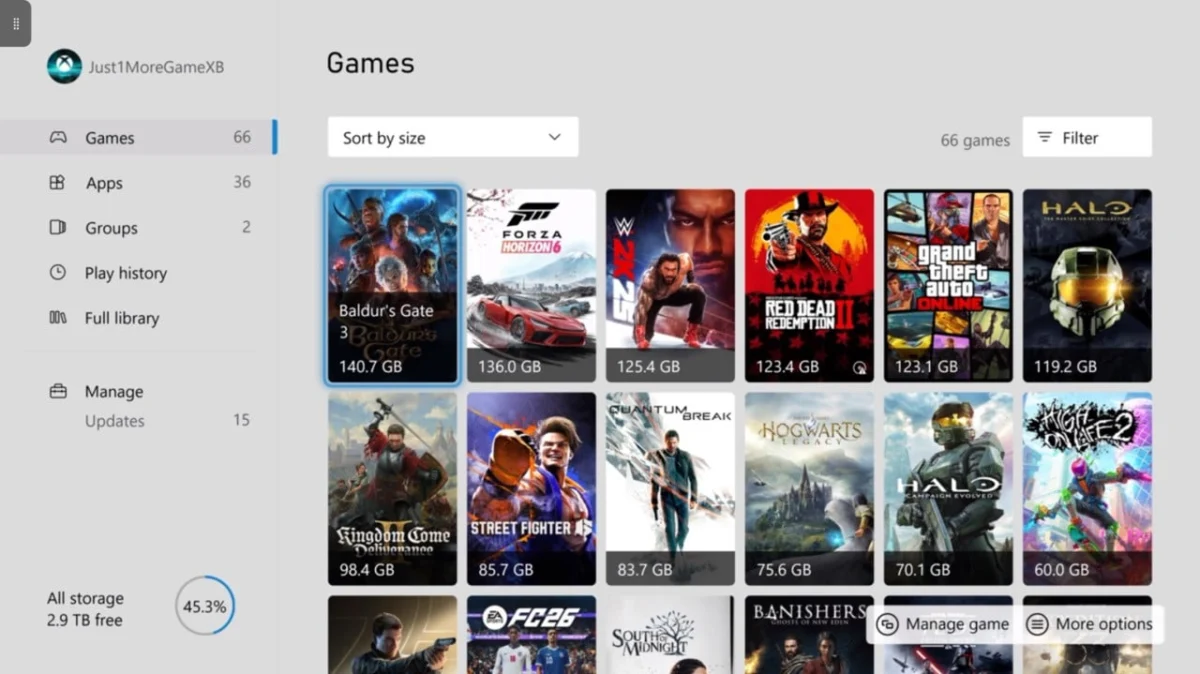
Microsoft has rolled out a significant update to its Xbox console ecosystem, introducing a highly anticipated "Poster" artwork style that allows users to display game titles with full, vertically oriented box art, moving away from the long-standing square tile format. This aesthetic enhancement, part of a broader system update, represents a strategic move by Xbox to deepen user personalization and visual immersion, aligning the digital display more closely with traditional physical game packaging. The change, while seemingly minor, addresses long-standing community feedback regarding dashboard aesthetics and the desire for more dynamic and expressive game representations.
The Evolution of Xbox Dashboard Aesthetics
The Xbox user interface (UI) has undergone numerous transformations since the console’s inception, each iteration reflecting technological advancements, design philosophies, and evolving user expectations. From the original Xbox’s "blades" interface, which offered a distinct, intuitive navigation system, to the Xbox 360’s "New Xbox Experience" (NXE) that introduced avatars and a more media-centric dashboard, Microsoft has consistently aimed to refine the user experience. The Xbox One era brought a tiled, Windows 8-inspired interface, which, while functional, often faced criticism for its perceived clutter and lack of deep customization. With the launch of the Xbox Series X|S, Microsoft initiated a more streamlined, performance-oriented dashboard, prioritizing speed and accessibility while still allowing for some personalization through dynamic backgrounds and themes.
The introduction of the "Poster" artwork style is a natural progression in this ongoing evolution. For years, game titles on the Xbox dashboard were presented as square tiles, a format that often necessitated cropping or reformatting original box art, leading to a loss of detail and the iconic visual identity associated with physical game cases. This new update rectifies that by enabling a portrait orientation, allowing for the full, uncropped display of game covers, echoing the cherished aesthetics of game boxes that many players grew up with. This shift is not merely cosmetic; it enhances game recognition, makes browsing more visually appealing, and fosters a stronger connection to the art and branding of individual titles.
Key Features of the Latest Xbox System Update
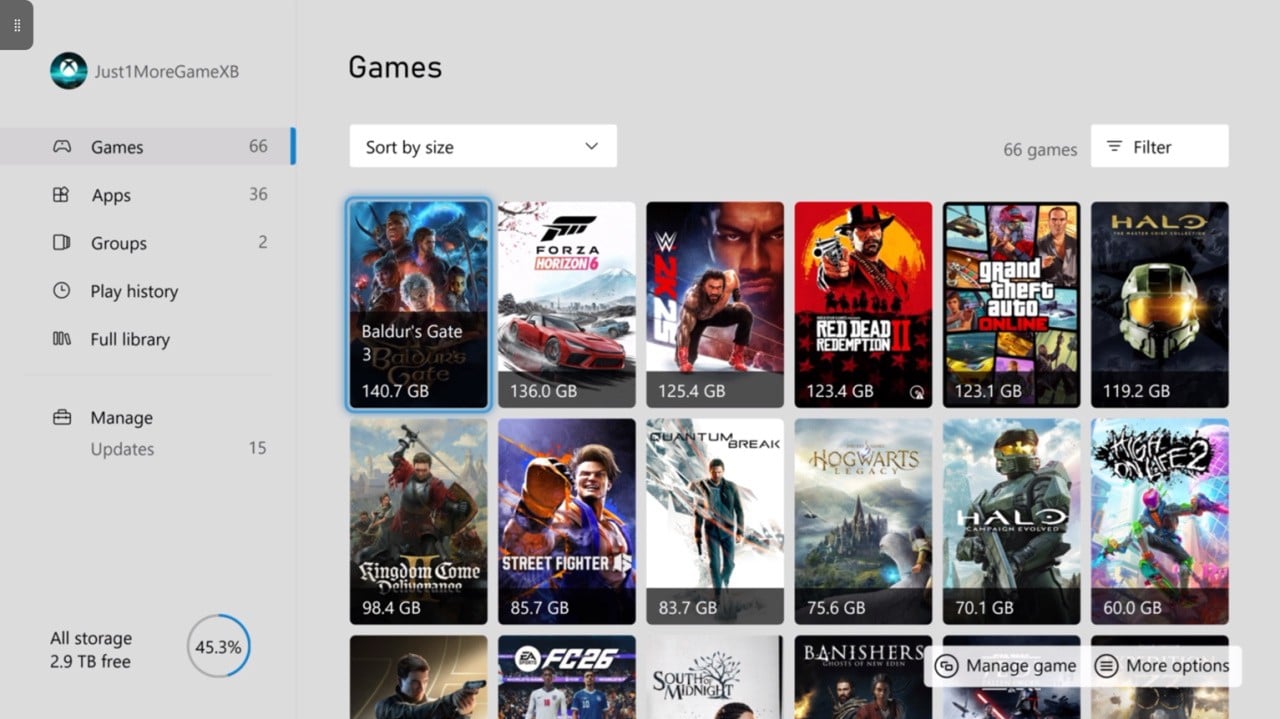
The "Poster" artwork style is one of several enhancements included in a recent major public update for Xbox consoles. While the exact date of the rollout (referenced as 2026/07 in the original source, likely a typo for a recent release) positions it within Microsoft’s continuous update cycle, the impact is immediate for users. This particular update package is designed to deliver a more refined, personalized, and efficient console experience.
Beyond the visual artwork upgrade, the update also features:
- Expanded Gamertag Options: A significant social enhancement, allowing for longer gamertags, which provides greater flexibility and uniqueness for player identities within the Xbox network. This change has been widely requested and reflects the diverse and growing global player base.
- Performance Optimizations: Underlying system improvements aimed at enhancing dashboard responsiveness, reducing load times, and generally improving the fluidity of navigation across the console’s UI. These "under-the-hood" changes are crucial for maintaining a premium user experience on high-performance consoles.
- Accessibility Enhancements: Microsoft consistently integrates new accessibility features to ensure its platform is inclusive for all players. While specific details were not provided, these often include improved narration options, colorblind modes, and controller remapping capabilities.
- Social Features Refinements: Updates to party chat, friend lists, and messaging functionalities, aiming to make it easier for players to connect, communicate, and play together.
- Store and Library Improvements: Tweaks to how games are displayed and managed within the Xbox Store and personal game library, potentially including better filtering, sorting options, and discovery tools.
These combined features underscore Microsoft’s commitment to continuous platform development, moving beyond hardware cycles to provide ongoing value through software innovation.
Activating the New "Poster" Artwork Style: A Step-by-Step Guide
For users eager to switch to the new "Poster" artwork display, the activation process is straightforward and integrated within the console’s personalization settings. While the original article did not provide explicit steps, based on typical Xbox UI navigation, users can expect to find this option within the main system settings:
- Navigate to Settings: From the Xbox dashboard, press the Xbox button on your controller to open the guide, then scroll to the right and select "Profile & system," followed by "Settings."
- Access Personalization: Within the Settings menu, select "General," then "Personalization."
- Choose My Background: In the Personalization menu, select "My background."
- Select Game Art Display: Within the background options, users should find a new setting related to "Show game art." Here, an option to select "Poster" or "Full Artwork" style will be available, alongside the traditional "Square" or "Tile" format.
- Confirm Selection: Choose the desired "Poster" artwork style and confirm the selection. The dashboard should update almost immediately to reflect the new visual presentation.
This user-friendly activation process ensures that players can easily tailor their console’s appearance to their preferences, highlighting Microsoft’s focus on intuitive design.

The Impact on User Experience and Visual Immersion
The shift to "Poster" artwork holds significant implications for the daily user experience. For many, the visual representation of games is a crucial aspect of their digital library. Full box art evokes a sense of nostalgia for physical game collections and provides a more authentic representation of a game’s branding and artistic direction. Publishers invest heavily in creating compelling box art that captures the essence of their titles, and displaying this art in its intended format allows players to appreciate these details without compromise.
- Enhanced Visual Appeal: The portrait orientation allows for richer detail and greater artistic expression on the dashboard. Game covers are often designed with a vertical emphasis, and the square tiles previously forced compromises that diminished their impact.
- Improved Game Recognition: With full artwork, games become instantly more recognizable, making it easier to navigate large digital libraries and quickly spot a desired title.
- Nostalgic Connection: For many long-time gamers, physical box art holds a special place. This update bridges the gap between digital convenience and the beloved aesthetics of physical media.
- A Sense of Ownership: Customization options like this contribute to a greater sense of ownership and personal connection to the console and its game library. It transforms the dashboard from a generic interface into a personalized showcase.
While the original article notes that this change might not "make much of a difference to my Xbox experience" in terms of core gameplay, it acknowledges it as a "nice quality-of-life feature." This perspective is crucial: these seemingly minor aesthetic tweaks cumulatively contribute to overall user satisfaction and platform loyalty. In a competitive market, every detail that enhances the user’s interaction with the console matters.
The Role of Theming: Light vs. Dark Modes
Accompanying the discussion of the "Poster" artwork, the article also touches upon the system’s thematic options, specifically mentioning the "Light" theme in contrast to the more commonly used "Dark" theme. Xbox, like many modern operating systems and applications, offers both light and dark modes, catering to different user preferences and environmental lighting conditions.
- Dark Theme: Often preferred by gamers, especially during extended play sessions in low-light environments, the dark theme reduces eye strain and can contribute to a more immersive experience by minimizing bright distractions. It also tends to be more power-efficient on certain display technologies.
- Light Theme: Offers a brighter, more open aesthetic, which can be preferable in well-lit rooms or for users who simply prefer a cleaner, higher-contrast look. The article notes an experiment with the Light theme, highlighting the importance of having options to periodically refresh the user interface.
The ability to switch between themes, found under "Personalisation" and "My Colour & Theme," further empowers users to customize their Xbox environment. This flexibility is a hallmark of modern UI design, recognizing that one size does not fit all when it comes to visual comfort and preference. The combination of dynamic themes and detailed artwork styles creates a highly customizable and visually engaging platform.
Broader Implications and Industry Trends
This update from Xbox can be viewed within a broader industry trend towards deeper personalization and user-centric design across all gaming platforms. In an era where digital libraries are expanding rapidly, the way games are presented and organized significantly impacts user engagement.
- Competitive Edge: PlayStation and Nintendo also offer various customization options, from dynamic themes to folder organization. By continually refining its UI, Xbox remains competitive, offering a polished and user-friendly experience that rivals its counterparts. These "quality-of-life" updates are often cited by users as reasons for platform preference.
- Publisher Benefits: For game developers and publishers, the ability to display full, uncropped artwork is a boon. It ensures their carefully crafted visual branding is presented optimally, potentially increasing visibility and appeal for games within the dashboard. This direct connection between game art and player engagement can subtly influence purchasing decisions and replayability.
- Future of UI/UX Design: This move suggests a future where console UIs become even more dynamic, personalized, and content-aware. We might see further integrations with game content, such as personalized recommendations based on gameplay, or AI-driven theme generation that adapts to a player’s habits. The focus on art and presentation could extend to more animated elements, interactive tiles, or even user-generated content for dashboard customization.
- Community Feedback Loop: Updates like the "Poster" artwork are often a direct result of community feedback. Gaming forums, social media, and official feedback channels consistently highlight user desires for more customization. Microsoft’s responsiveness to these requests reinforces trust and loyalty within its player base, demonstrating that the company listens to its customers.
Conclusion: The Enduring Value of Detail
In the vast and complex ecosystem of modern gaming consoles, it is often the seemingly small details that leave the most lasting impression. The introduction of the "Poster" artwork style on Xbox is a prime example of such an enhancement. While it doesn’t revolutionize gameplay or introduce groundbreaking new functionalities, it significantly elevates the aesthetic quality and personalization options available to users. By embracing full, portrait-oriented game art, Xbox not only taps into a nostalgic appreciation for traditional box art but also enhances the visual appeal and navigability of its dashboard.
Coupled with other concurrent updates, such as extended gamertag options and ongoing performance improvements, this release underscores Microsoft’s unwavering commitment to refining the Xbox user experience. These continuous quality-of-life adjustments, alongside major feature additions, are vital for maintaining platform relevance and user satisfaction in an intensely competitive industry. Ultimately, by empowering players with more control over their console’s visual identity, Xbox reinforces the idea that the gaming experience extends beyond the screen, encompassing every interaction a player has with their system. The subtle power of well-executed design details continues to shape how millions engage with their digital worlds.