

The Razer Blade 18 (2025) has officially entered the high-end hardware market as a definitive desktop replacement, signaling a shift in how manufacturers balance extreme performance with the constraints of a portable form factor. Featuring a suite of next-generation components, including the NVIDIA GeForce RTX 5090 Laptop GPU and the Intel Core Ultra 9 275HX Series 2 processor, this machine is designed for a niche audience of enthusiast gamers and professional content creators who require uncompromising power. While the device maintains the sleek, minimalist aesthetic characteristic of the Razer brand, its internal architecture represents a significant departure from previous iterations, pushing the limits of thermal management and mobile computing power.

Technical Specifications and Architecture
The 2025 model of the Razer Blade 18 is built upon a foundation of cutting-edge silicon and high-speed memory. The inclusion of the NVIDIA GeForce RTX 5090 Laptop GPU, operating at a 175W Total Graphics Power (TGP), introduces the industry to 24GB of GDDR7 VRAM. This transition to GDDR7 marks a substantial increase in memory bandwidth compared to the previous generation, allowing for more efficient handling of high-resolution textures and complex ray-tracing calculations. Supporting the GPU is the Intel Core Ultra 9 275HX Series 2 CPU, which features a 24-core, 24-thread configuration and a maximum boost clock of 5.4GHz. This processor is specifically tuned for multi-threaded workloads, such as 8K video rendering and real-time 3D modeling, while maintaining efficiency during lower-intensity tasks.
The system is equipped with 64GB of DDR5-5600 MHz RAM, ensuring that even the most memory-intensive applications operate without bottlenecks. Storage is equally robust, featuring a 4TB PCIE Gen4 SSD, providing ample space for large-scale gaming libraries and professional media assets. Connectivity has also seen a major upgrade; the Blade 18 is among the first laptops to feature Thunderbolt 5 technology. With significantly higher data transfer speeds than its predecessor, Thunderbolt 5 allows for more complex multi-monitor setups and faster external storage throughput, further cementing the device’s status as a workstation.

Design, Build Quality, and Thermal Management
Razer has retained its signature CNC-milled aluminum chassis, finished in anodized black. Despite the immense power of the internal components, the laptop maintains a relatively thin profile, ranging from 21.99mm to 27.94mm in thickness. However, the density of the machine is notable, weighing approximately 7.06 lbs (3.2kg). This weight, combined with the structural rigidity of the single-block aluminum frame, results in a device that is stable on a desk but challenging for traditional mobile use.
A primary concern for any laptop utilizing a 175W GPU is thermal regulation. Razer addresses this through an advanced Vapor Chamber cooling system that covers approximately 57% of the motherboard’s surface area. This system is designed to dissipate heat more evenly than traditional heat pipes, preventing thermal throttling during extended gaming sessions. In a unique design choice, Razer has included an RGB-illuminated "viewing window" on the bottom of the laptop, allowing users to see the vapor chamber. While primarily aesthetic, it serves as a visual reminder of the engineering required to keep such high-performance hardware operational in a confined space.

The Dual-Mode Display Innovation
One of the most talked-about features of the Razer Blade 18 is its 18-inch IPS display, which offers a unique dual-mode functionality. Users can toggle between two distinct settings based on their immediate needs:
- UHD+ Mode: 3840 x 2400 resolution at a 240Hz refresh rate, ideal for content creation and cinematic gaming.
- FHD+ Mode: 1920 x 1200 resolution at a 440Hz refresh rate, targeting competitive eSports players who prioritize frame timing and motion clarity over pixel density.
While the 16:10 aspect ratio provides more vertical screen real estate for productivity, the lack of HDR support remains a point of contention among enthusiasts, especially given the premium pricing. Furthermore, the transition between display modes through Razer’s Synapse software can occasionally cause scaling issues within Windows 11, requiring manual adjustment of text and icon sizes to maintain visual consistency. Despite these minor software hurdles, the 18-inch panel provides an immersive experience that traditional 15-inch or 17-inch laptops cannot match.

Gaming Performance and Benchmarks
In real-world testing, the Razer Blade 18 (2025) demonstrates the raw power of the Blackwell-based RTX 5090 architecture. When running Cyberpunk 2077—a title widely considered the benchmark for modern PC hardware—the device achieved an average of 90 FPS at 4K resolution with DLSS Frame Generation and ray-tracing features enabled. This performance level was previously reserved for high-end desktop towers, illustrating the narrowing gap between mobile and stationary gaming hardware.
The laptop also excelled in newer releases and demanding engines:

- REANIMAL: Utilizing Unreal Engine 5’s Nanite and Lumen technologies, the Blade 18 maintained a highly responsive 136 FPS.
- High on Life 2: The device leveraged the full suite of NVIDIA’s AI-driven upscaling to deliver a fluid experience with maxed-out graphical settings.
- Sektori: In less demanding but high-refresh-rate-dependent titles, the laptop easily hit the 240 FPS cap of the UHD+ mode, providing near-instantaneous input feedback.
While the fans do ramp up significantly under heavy loads, the noise profile is consistent and lacks the high-pitched whine found in smaller gaming laptops. The six-speaker array, tuned with THX Spatial Audio, provides a wide soundstage that can effectively compete with the fan noise, though most users at this level will likely opt for high-fidelity headsets.
Input Devices and Ergonomics
The keyboard on the Blade 18 is frequently cited as one of the best in the laptop market. It features 1.5mm of key travel and a 63g actuation force, providing a tactile experience that balances typing speed with gaming precision. The inclusion of a dedicated—albeit compact—numpad is a welcome addition for professionals using the device for data entry or complex hotkey mapping in creative software.

Razer’s Synapse software allows for per-key RGB customization, but it also includes functional lighting features. For instance, holding the "Function" or "Shift" keys illuminates only the keys that have secondary shortcuts assigned to them, a subtle but highly effective quality-of-life feature. Below the keyboard sits an oversized XL glass trackpad. Its responsiveness and palm-rejection technology make it one of the few Windows-based trackpads that can realistically be used for productivity without an external mouse.
Connectivity and Port Configuration
Designed to function as a hub for a full workstation, the Blade 18 offers an extensive array of ports:

- Right Side: Thunderbolt 5, HDMI 2.1, USB 3.2 Gen 2 Type-A, and a UHS-II SD Card Reader.
- Left Side: 2.5Gbps Ethernet, two USB 3.2 Gen 2 Type-A ports, Thunderbolt 4, and a 3.5mm combo audio jack.
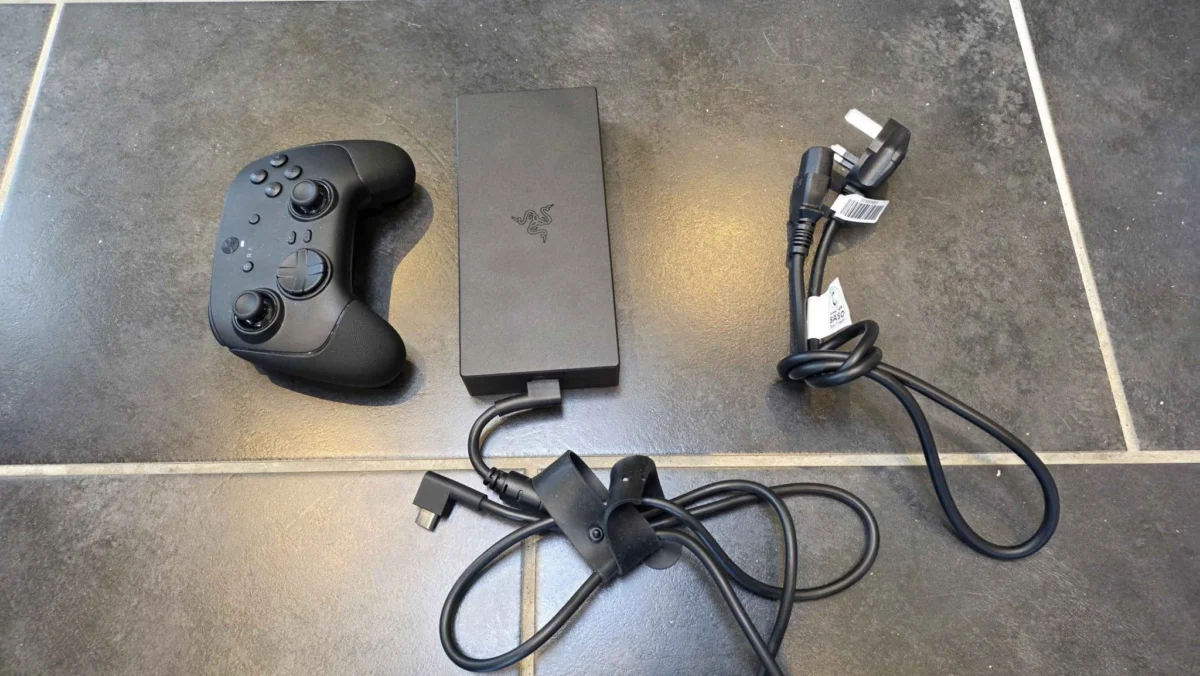
The inclusion of a full-sized SD card reader is a critical feature for photographers and videographers, while the 2.5Gbps Ethernet port ensures low-latency connectivity for competitive gaming. However, the proprietary power port connects to a massive 400W power brick. This brick is nearly the size of a standard tablet and adds significant bulk to the overall travel weight of the system.
The Portability Paradox and Battery Life
Despite being a "laptop," the Razer Blade 18 faces the inherent limitations of its class. The 99 Whr battery—the maximum size allowed by the FAA for air travel—struggles to power the 18-inch display and high-wattage internals for extended periods. During standard productivity tasks such as web browsing or document editing, the battery lasts approximately two hours. Under gaming loads, this figure drops significantly, often requiring the device to remain plugged in to maintain maximum performance levels.

Efforts to utilize the device as a "console-like" experience via Microsoft’s Xbox Full Screen Experience yielded mixed results. Issues with Windows 11’s sleep states and controller-wake functionality suggest that while the hardware is capable of replacing a console, the operating system still requires refinement for a seamless, peripheral-only user experience.
Market Positioning and Economic Impact
The Razer Blade 18 (2025) is positioned at the extreme top of the market. With a starting price of $3,499 and the tested configuration reaching $5,199.99, it is an investment rather than a casual purchase. This pricing strategy places Razer in direct competition with the highest-tier offerings from Alienware and ASUS ROG, though Razer leans more heavily into the "lifestyle" and "professional" crossover market.

Industry analysts suggest that the success of such high-priced desktop replacements indicates a growing trend of users abandoning traditional desktop towers in favor of "portable powerhouses." As remote work and nomadic professional lifestyles become more common, the demand for a device that can be packed into a backpack—even a large one—without sacrificing the ability to render 3D scenes or play AAA titles at 4K is at an all-time high.
Conclusion
The Razer Blade 18 (2025) is a remarkable feat of engineering that successfully integrates desktop-class components into a mobile chassis. While its price and size make it "overkill" for the average consumer, it serves as a vital tool for those whose work or hobbies demand the absolute ceiling of current technology. By combining the power of the RTX 5090 with a versatile dual-mode display and a robust thermal solution, Razer has set a high bar for the 2025 hardware cycle. It is not merely a laptop; it is a statement on the future of high-performance computing.